








Hybrid work has moved corporate traffic into airports, hotels, coworking spaces, and conference venues. Employees connect to public Wi-Fi dozens of times a month, often on laptops and phones that hold corporate credentials and active sessions. Each connection is a trust decision made by a device, frequently without the user’s input. Attackers exploit that automation.
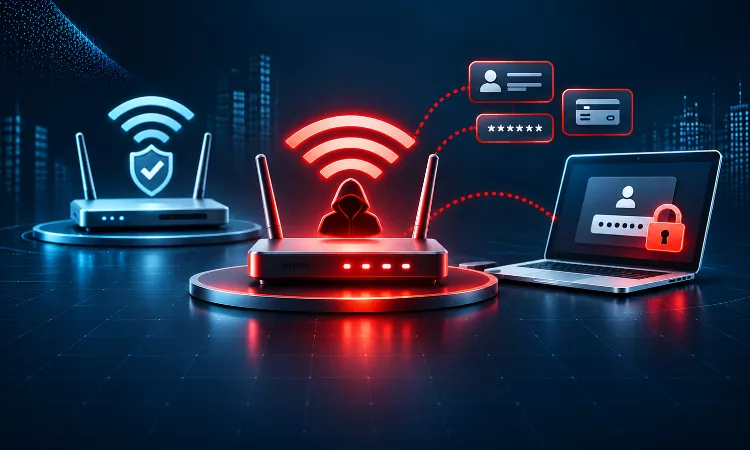
An evil twin attack places a rogue access point in the physical environment and presents it as a legitimate network. For a CISO, the risk is less about the Wi-Fi network itself and more about what a single captured login can open across cloud email, file shares, and SaaS applications.
What Is an Evil Twin Attack?
An evil twin attack is a wireless impersonation technique in which an attacker broadcasts an access point with the same network name, or SSID, as a trusted network. Devices that recognize the name may connect to the rogue access point instead of the genuine one. Once connected, the attacker sits in the traffic path and can observe, redirect, or modify what the user sends.
The attack depends on how client devices choose networks. Phones and laptops store preferred network profiles and reconnect automatically when a matching name appears. Signal strength often influences which access point the device selects. An attacker does not need to break encryption on the genuine network. The attacker only needs the device to trust the wrong access point.
Why Do Evil Twin Attacks Succeed Against Enterprise Users?
Evil twin attacks succeed because they target trust decisions that users and devices make in seconds. Three conditions make the attack effective.
First, many devices automatically connect to saved networks without prompting. Second, users often accept captive portal pages and certificate warnings without reading them. Third, employees work outside controlled environments where they cannot verify whether the network belongs to their organization.
The Credential Capture Path
The most damaging outcome occurs when corporate devices accept a fraudulent server certificate. Enterprise Wi-Fi commonly uses WPA2-Enterprise or WPA3-Enterprise with 802.1X authentication, where the client sends credentials to a RADIUS server. If the client does not validate the server certificate, it may send its authentication exchange to the attacker’s system. Depending on the protocol and configuration, the attacker may capture data that can be used for offline password cracking or replay. Devices configured to trust any certificate in this flow give up the protection that enterprise authentication was designed to provide.
How Does an Evil Twin Attack Capture Credentials?
The attack typically unfolds in four stages. The sequence matters because each stage has a corresponding defensive control.
- Reconnaissance: The attacker identifies the network names employees use, often by observing public broadcasts or reviewing the venue’s published guest network.
- Impersonation: The attacker broadcasts a network with a matching name, sometimes with a stronger signal to influence device selection.
- Interception or redirection: A user connects and receives a fake login portal, a certificate warning, or a silent traffic path through the attacker’s system.
- Credential capture: The user enters credentials into the fake page, or the device transmits authentication data that the attacker can intercept.
The fourth stage creates the lasting exposure. A captured password can be reused against corporate email, VPN portals, and cloud identity providers, and that reuse is the step that turns a wireless incident into an identity incident.
What Risks Does an Evil Twin Create for Enterprises?
The exposure extends beyond the individual device. The table below maps each mechanism to its business consequence.
| Exposure | Mechanism | Business Consequence |
| Credential theft | Fake portal or intercepted authentication | Account takeover in email, VPN, and SaaS platforms |
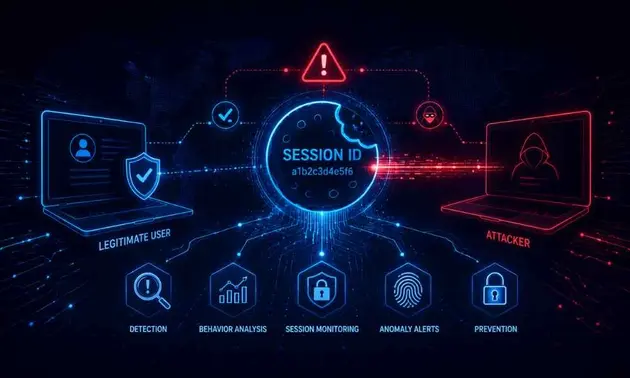
| Session hijacking | Captured session tokens or cookies | Access without re-authentication, bypassing MFA prompts in some flows |
| Data interception | Unencrypted or downgraded traffic | Exposure of customer records, source code, or financial data |
| Malware delivery | Fake software update prompts or redirected downloads | Endpoint compromise that persists after the user leaves the venue |
| Lateral movement | Stolen credentials used against internal systems | Escalation into regulated data environments |
The highest-impact path runs through identity. An attacker who holds a valid employee credential may appear legitimate to every downstream control that trusts the identity provider.
Which Standards Address Rogue Wireless Access Points?
Several frameworks require organizations to manage wireless exposure directly. PCI DSS v4.0.1 Requirement 11.2.1 calls for an inventory of authorized wireless access points and for quarterly detection and identification of unauthorized ones in environments that process cardholder data. ISO/IEC 27001:2022 Annex A control 8.20 covers network security, and control 8.21 covers the security of network services, which together cover wireless segments and the controls that protect them.
Special Publication 800-153 provides guidelines for securing wireless local area networks, including recommendations for rogue detection and client configuration. Organizations seeking practical guidance can review the NIST Computer Security Resource Center and the Wi-Fi Alliance for current security specifications, including WPA3.
How Can Enterprises Detect Rogue Access Points?
Detection depends on continuous monitoring, because a rogue access point may appear and disappear within a single day. Three methods provide the most reliable coverage.
- Wireless intrusion prevention systems (WIPS): Sensors across corporate sites scan the radio environment, compare observed access points against an authorized inventory, and alert when an unknown device uses a corporate network name.
- Scheduled wireless surveys: Periodic site walks with validated tooling identify unauthorized hardware in offices, data centers, and retail locations, and they establish a baseline that monitoring can compare against.
- Mobile device telemetry: Endpoint management platforms can report Wi-Fi profiles, certificate trust settings, and connections to unexpected networks, which gives security teams visibility into the client side of the attack.
Detection data should feed the asset inventory. An access point that cannot be matched to an owner, a location, and an approved configuration should trigger investigation.
How Should Organizations Prevent Credential Theft Through Evil Twins?
Prevention works best when several controls reinforce each other. No single setting stops every variant of the attack.
- Enforce server certificate validation: Deploy managed Wi-Fi profiles that require the client to validate the RADIUS server certificate and specify the trusted certificate authority and server name. This closes the path through which a fraudulent authentication server receives credentials.
- Adopt WPA3-Enterprise where hardware supports it: WPA3 strengthens the handshake against offline attacks and improves protection for traffic on enterprise networks.
- Use an always-on VPN for mobile and remote devices: A tunnel that establishes before application traffic moves limits what a rogue network can observe.
- Require phishing-resistant multi-factor authentication: FIDO2 security keys and certificate-based authentication limit the value of a captured password. Fake portals cannot easily replicate hardware-bound credentials.
- Remove unnecessary saved networks: Corporate devices should carry only the profiles they need, and public network names should not be stored automatically.
- Train users on certificate warnings and portal behavior: Employees should treat unexpected login prompts, certificate errors, and unexpected re-authentication requests as signals to stop and report.
Mobile device management policies should enforce these settings centrally. A user who understands the risk still needs the device to refuse an untrusted certificate by default.
What Mistakes Leave Employees Exposed?
Three gaps appear repeatedly in enterprise assessments. Each one is structural rather than a matter of individual carelessness.
- Trusting the network name. Security policies that focus on the SSID alone ignore the authentication path, which is where credentials are exposed.
- Accepting certificate prompts by default. When certificate warnings appear routinely in daily work, staff learn to dismiss them.
- Treating wireless as a facilities issue. Guest networks, branch offices, and visitor areas often sit outside the security team’s monitoring scope, which leaves a blind spot in the identity perimeter.
Where Does Ampcus Cyber Fit Into Rogue Access Point Programs?
Ampcus Cyber addresses evil twin exposure as part of broader attack surface management. Threat Vulnerability Radar helps teams rank wireless and identity exposures by business risk rather than by finding count. Engagements follow the T-SAMA methodology, moving from Train and Scope through Assess, Mitigate, and Audit.
Ready to close the wireless gaps in your identity perimeter?
| Contact Ampcus Cyber to scope a rogue access point assessment with a certificate validation review and a remediation roadmap. |
People Also Ask
What is an evil twin attack?
It is a wireless attack in which a rogue access point uses the same network name as a trusted network. Devices that connect to it can have their traffic observed or their users tricked into entering credentials.
How does an evil twin steal passwords?
It presents a fake login page, or it intercepts authentication traffic when devices fail to validate the server certificate. Captured credentials can then be reused against corporate systems.
How can you tell if you are connected to an evil twin?
Unexpected certificate warnings, login prompts on public networks, and unfamiliar re-authentication requests are common signs. Users should disconnect and report the network to IT security.
Does WPA3 prevent evil twin attacks?
WPA3 strengthens protection against certain wireless attacks, but it does not stop an impersonating access point on its own. Certificate validation and user authentication controls remain necessary.
Do VPNs protect against evil twin attacks?
An always-on VPN limits what a rogue network can observe, but it does not prevent credential theft from a fake login page. Phishing-resistant multi-factor authentication addresses that gap.
Enjoyed reading this blog? Stay updated with our latest exclusive content by following us on Twitter and LinkedIn.